

If you’ve ever fallen down a random internet rabbit hole (don’t worry, we all have), you probably know how strangely satisfying simple online games can be. One afternoon, while waiting for a file to download, I typed something into Google Images and—boom—found myself playing a colorful, brick-busting mini-game I didn’t even know existed.
That game? Google Block Breaker — better known as Google’s Atari Breakout Easter Egg.
And yes… it’s as addictive as it sounds.
In this post, we’ll break down what Google Block Breaker is, how to play it, why it exists, and even share some tips, tricks, and common mistakes to avoid.
Let’s dive in!
What Is Google Block Breaker?
Google Block Breaker is a playful Easter egg inspired by the classic arcade game Atari Breakout (1976). It transforms a Google Images search results page into an interactive brick-breaking game complete with a paddle, bouncing ball, and animated blocks.
The concept is simple: use your paddle to bounce a ball and clear all the blocks onscreen.
But just like the original arcade game, the fun is in its fast pace and surprising challenge.
Why Is It Called an “Easter Egg”?
In tech culture, an Easter egg is a hidden feature or surprise inserted into software as a fun bonus. Google is famous for these—think of “do a barrel roll,” “Google gravity,” or the dinosaur game that pops up when your internet goes out.
Block Breaker is one of the fan-favorite Easter eggs because:
- It’s nostalgic
- It’s instantly playable
- It showcases Google’s fun, creative side
How to Play Google Block Breaker (Step-by-Step)
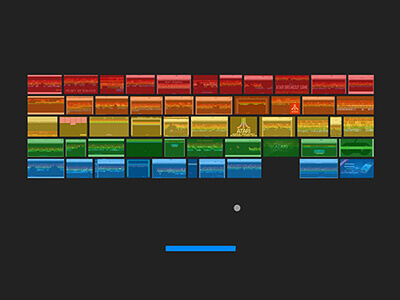

Google sometimes rotates or retires Easter eggs, so availability can change. However, here are the primary ways people access the game when it’s active:
Method 1: Through Google Images
- Open Google Images.
- Type Atari Breakout into the search bar.
- If the Easter egg is active, the image results transform into the game.
- Use your mouse or trackpad to move the paddle.
- Keep the ball from falling — and clear all the blocks!
Method 2: Via Google Easter Egg Hubs or Mirror Sites
Some websites archive classic Google Easter eggs. Search for terms like:
- “Google Atari Breakout game online”
- “Google Block Breaker mirror”
Just be sure the site is safe and reputable.
Tools Required
Good news: you don’t need anything fancy.
- A browser (Chrome, Safari, Firefox, Edge — any modern one works)
- Keyboard or mouse/trackpad (mouse usually feels more precise)
- Internet connection (unless using an offline replica)
That’s it!
Why People Love Google Block Breaker
1. It’s Quick & Zero-Commitment
Perfect when you need a 5-minute break… which sometimes becomes 20.
2. Retro Nostalgia
Fans of classic arcade games love the throwback feel.
3. Brain Reset & Light Stress Relief
It’s simple enough to be relaxing but fast enough to be engaging.
4. Kid-Friendly Fun
Safe, simple, and easy to learn.
Pro Tips to Improve Your Score
Want to play like a pro? Try these simple strategies:
✔️ Stay Near the Center
You’ll have more range to chase the ball when it speeds up.
✔️ Anticipate Angles
Where the ball hits your paddle determines its direction.
Hit slightly off-center for controlled angles.
✔️ Watch the Ball, Not the Paddle
Your hand will follow naturally if you keep your eyes on the ball.
✔️ Use Small, Controlled Movements
Large jumps make it easier to miss fast rebounds.
✔️ Break Through the Top
Once the ball gets behind the blocks, it bounces around rapidly, clearing multiple rows.
Common Mistakes to Avoid
- Staring at the paddle instead of the ball
- Over-moving the paddle and losing accuracy
- Letting the ball hit the extreme paddle edges
- Playing on a trackpad when a mouse is available
- Panicking when the ball speeds up (breathe!)
Real-World Uses & Fun Applications
1. Quick Office Brain Breaks
Block Breaker is a perfect between-task refresher.
2. Teaching Basic Physics Concepts
Great for illustrating angles, speed, and motion in a fun way.
3. Family-Friendly Mini-Competitions
Set a timer and let everyone try to beat the high score.
4. Digital Nostalgia Events or Retro Gaming Nights
Pair it with Pac-Man, Snake, and Tetris clones for a throwback evening.
Google Block Breaker vs. Similar Mini-Games
Here’s how it stacks up against other iconic Google Easter eggs:
| Google Game | Difficulty | Fun Factor | Best Feature |
|---|---|---|---|
| Block Breaker | Medium | ⭐⭐⭐⭐⭐ | Satisfying arcade feel |
| Dino Game | Easy–Hard | ⭐⭐⭐⭐ | Offline-friendly |
| Pac-Man | Medium | ⭐⭐⭐⭐ | Faithful recreation |
| Snake | Easy | ⭐⭐⭐ | Classic simplicity |
Final Takeaway
Google Block Breaker isn’t just a game — it’s a reminder that the internet still has hidden pockets of joy. Whether you’re nostalgic for retro arcades or simply need a two-minute mental reset, it’s a delightful surprise tucked inside the world’s most popular search engine.
Give it a try the next time you need a quick break — you might be surprised how relaxing breaking digital bricks can be.
FAQs
1. Is Google Block Breaker still available?
Google often cycles Easter eggs, so availability varies. If it doesn’t appear in Google Images, try reputable mirror sites.
2. Is it safe to play?
Yes — but only use trusted sources if accessing a replica outside Google.
3. Can I play it on mobile?
Sometimes, depending on your browser. A desktop experience is smoother.
4. Does it require installation?
Nope! It runs directly in your browser.
5. Why did Google create it?
To celebrate Atari’s 37th anniversary and offer a fun, nostalgic Easter egg for users.

Michael Grant is a business writer with professional experience in small-business consulting and online entrepreneurship. Over the past decade, he has helped brands improve their digital strategy, customer engagement, and revenue planning. Michael simplifies business concepts and gives readers practical insights they can use immediately.