

If you’ve ever had a coding idea at midnight — a SaaS concept, a quick automation, a side project — and lost momentum because setup felt heavier than the idea itself, you already understand why Replit AI matters.
The modern internet runs on speed. Ideas move fast. Markets move faster. But traditional development workflows? They still assume you have time, tooling, patience, and a perfectly configured machine. That gap between idea and execution is exactly where what is Replit AI becomes more than a curiosity — it becomes a competitive advantage.
This guide is written for founders, indie hackers, students, content creators, product managers, and even non-technical professionals who want to build, not babysit tools. I’ve used Replit in real scenarios: prototyping MVPs, teaching beginners, stress-testing AI code assistants, and collaborating with distributed teams. This isn’t theory. It’s lived experience.
By the end of this article, you’ll understand not just what Replit AI is, but when it shines, when it struggles, and how to use it intelligently so it actually saves you time instead of creating new problems.
What Is Replit AI? (Beginner-Friendly, Expert-Relevant Explanation)
At its core, Replit AI is an artificial-intelligence-powered coding assistant built directly into the Replit ecosystem. Unlike standalone AI tools that live in a browser tab or plugin, Replit AI is embedded inside the development environment itself.
Think of it less like “ChatGPT for code” and more like a junior developer sitting beside you, watching your screen, understanding your project context, and helping in real time.
Most people first encounter Replit AI through features like:
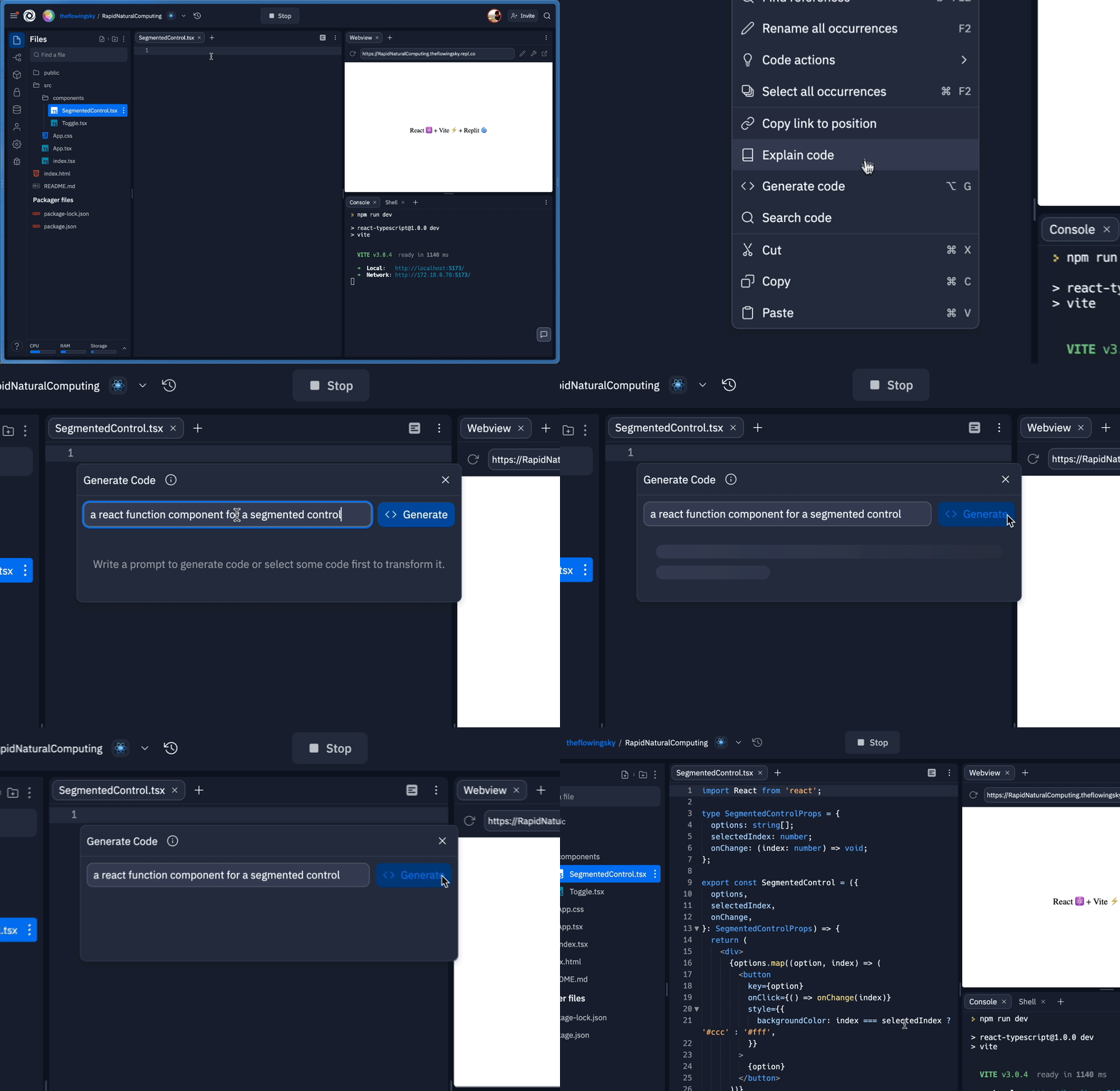
- Writing new code from plain-English prompts
- Explaining unfamiliar code line by line
- Debugging errors with contextual awareness
- Refactoring messy logic into cleaner structures
But that surface-level description undersells what’s happening.
Replit AI works inside your live project. It understands:
- Your file structure
- Your language and framework
- Variables, imports, and dependencies
- The runtime environment
That context awareness is the real difference. Traditional AI tools answer questions. Replit AI collaborates on your project.
A helpful analogy:
Using normal AI for coding is like asking a mechanic for advice over the phone. Using Replit AI is like having the mechanic inside the garage, tools in hand, looking at your actual engine.
Why Replit AI Exists (And Why It’s Gaining Momentum Now)
To understand what Replit AI really is, you need to understand the problem it solves — because this tool didn’t emerge by accident.
Modern software development has three growing pain points:
- Environment friction
Installing languages, SDKs, frameworks, and dependencies still breaks beginners and slows professionals. - Cognitive overload
Developers spend more time remembering syntax and debugging boilerplate than solving real problems. - Collaboration barriers
Sharing code across teams, classrooms, or time zones often introduces setup mismatches and confusion.
Replit already solved the first and third problems by moving development to the cloud. Replit AI was the natural next step: reduce cognitive friction.
Instead of asking, “How do I write this function again?”
You ask, “I want a login system with email validation.”
Instead of Googling error messages for 30 minutes,
You ask, “Why is this crashing?”
That shift — from syntax-first to intent-first development — is why Replit AI feels transformative to some users and unnecessary to others. If you value speed, clarity, and momentum, it’s hard to go back.
How Replit AI Actually Works Behind the Scenes (Without the Hype)
Replit AI isn’t magic, and understanding its mechanics helps you use it better.
At a high level, Replit AI is powered by large language models trained on code and natural language. But what makes it effective is how Replit wraps that intelligence around your environment.
Here’s what happens when you use Replit AI:
- You write a prompt (or trigger AI from existing code).
- Replit captures relevant project context:
- Open files
- Language runtime
- Error output
- Dependencies
- The AI generates suggestions tailored to your exact setup.
- You can insert, modify, or reject changes instantly.
The key limitation to understand:
Replit AI is assistive, not autonomous. It doesn’t “understand” business goals. It understands patterns. Your judgment still matters.
In practice, the best results come when you:
- Give specific prompts
- Review output critically
- Use AI as a multiplier, not a replacement
Treat it like a fast intern — brilliant at execution, terrible at assumptions.
Benefits of Replit AI in Real-World Scenarios (Not Just Demos)
For Beginners and Students
For beginners, Replit AI lowers the barrier to entry in a way tutorials never could.
Instead of stopping at:
“I don’t understand this error”
They can ask:
“Explain this error like I’m new to Python”
That feedback loop accelerates learning. I’ve seen students grasp concepts in days that previously took weeks — not because AI replaces thinking, but because it removes friction.
For Indie Hackers and Solo Builders
Speed is everything when you’re building alone.
Replit AI helps with:
- Rapid MVP prototyping
- Spinning up APIs or microservices
- Validating ideas before investing deeply
The “before vs after” difference is stark:
- Before: setup, docs, Stack Overflow, trial and error
- After: describe intent, refine output, ship faster
For Professionals and Teams
For experienced developers, the value isn’t teaching syntax — it’s saving mental energy.
Replit AI excels at:
- Writing boilerplate
- Refactoring repetitive logic
- Explaining unfamiliar legacy code
- Helping onboard new teammates
It doesn’t replace senior judgment. It protects it.
Step-by-Step: How to Use Replit AI Effectively (From Day One)
Step 1: Start With a Clear Goal, Not a Vague Prompt
Bad prompt:
“Make this better”
Good prompt:
“Refactor this function to reduce duplication and improve readability”
AI mirrors clarity. The clearer you are, the better the output.
Step 2: Let AI Draft, Then You Direct
Use Replit AI to:
- Generate first versions
- Propose alternatives
- Surface edge cases
Then step in. Adjust naming. Add constraints. This hybrid workflow is where productivity explodes.
Step 3: Use AI to Debug, Not Guess
When something breaks, don’t panic-code. Ask:
“Why is this returning null in this case?”
Replit AI can interpret stack traces and context faster than most humans.
Step 4: Iterate, Don’t Over-Trust
AI suggestions are drafts, not decisions. Review everything. Production mistakes happen when AI output is accepted blindly.
Replit AI vs Other AI Coding Tools (Honest Comparison)
Replit AI vs GitHub Copilot
Copilot shines inside mature IDEs. Replit AI shines when:
- You want zero setup
- You want everything in one browser tab
- You want collaborative, cloud-native development
Replit AI vs ChatGPT
ChatGPT is a brilliant generalist. Replit AI is a specialist.
ChatGPT:
- Great explanations
- No live project context
Replit AI:
- Less conversational
- Deep awareness of your actual codebase
In practice, many professionals use both — but Replit AI is where execution happens.
Common Mistakes People Make With Replit AI (And How to Avoid Them)
Mistake 1: Treating AI as a Senior Engineer
AI doesn’t know your users, deadlines, or risks. Always apply human judgment.
Mistake 2: Writing Lazy Prompts
Vague prompts produce vague code. Be precise. Specify language, constraints, and goals.
Mistake 3: Ignoring Security and Performance
AI-generated code may work — but not securely or efficiently. Review authentication, validation, and data handling carefully.
When Replit AI Is the Wrong Tool
Balanced perspective matters.
Replit AI may not be ideal if:
- You’re working on extremely large, enterprise-scale codebases
- You need deep offline IDE customization
- You already have a heavily optimized local workflow
Knowing when not to use a tool is part of expertise.
The Future of Replit AI (And What It Signals About Coding)
Replit AI isn’t just a feature. It’s a signal.
The future of coding is:
- More conversational
- More intent-driven
- Less environment-dependent
We’re moving from writing code to directing systems. Replit AI is an early glimpse of that shift.
FAQs
Is Replit AI free?
Replit AI offers limited free usage, with expanded features under paid plans.
Can beginners really use Replit AI?
Yes — arguably beginners benefit the most, especially for learning and experimentation.
Does Replit AI replace programmers?
No. It replaces friction, not thinking.
Is Replit AI good for production apps?
Yes, if you review, test, and secure the output properly.
What languages does Replit AI support?
Most major languages supported by Replit, including Python, JavaScript, and more.

Adrian Cole is a technology researcher and AI content specialist with more than seven years of experience studying automation, machine learning models, and digital innovation. He has worked with multiple tech startups as a consultant, helping them adopt smarter tools and build data-driven systems. Adrian writes simple, clear, and practical explanations of complex tech topics so readers can easily understand the future of AI.