
If you’ve spent any time creating content lately—videos, podcasts, ads, games, or even internal training—you’ve probably hit the same wall I have more than once: voice. Good voice work is expensive. Fast voice work is risky. And scalable voice work has traditionally meant robotic, lifeless text-to-speech that instantly kills credibility.
That’s exactly why Uberduck AI has become such a persistent topic in creator, developer, and marketing circles.
This isn’t just another “AI tool of the month.” Uberduck AI sits at the intersection of synthetic media, voice cloning, and practical production workflows. It promises something creators have wanted for years: realistic, customizable voices you can actually use in real projects without booking a studio or wrangling freelancers across time zones.
This guide is written for people who don’t just want to know what Uberduck AI is—but whether it’s worth integrating into real-world workflows. If you’re a content creator trying to scale output, a developer building voice-enabled apps, a marketer experimenting with audio ads, or a founder looking for leverage, this article is for you.
I’ll walk you through Uberduck AI from beginner-friendly concepts to expert-level usage, including where it shines, where it falls short, and how people actually use it in production—not just demos.
By the end, you’ll know whether Uberduck AI belongs in your stack, how to use it properly, and what mistakes to avoid if you care about quality and credibility.
What Uberduck AI Actually Is (Explained Without the Buzzwords)
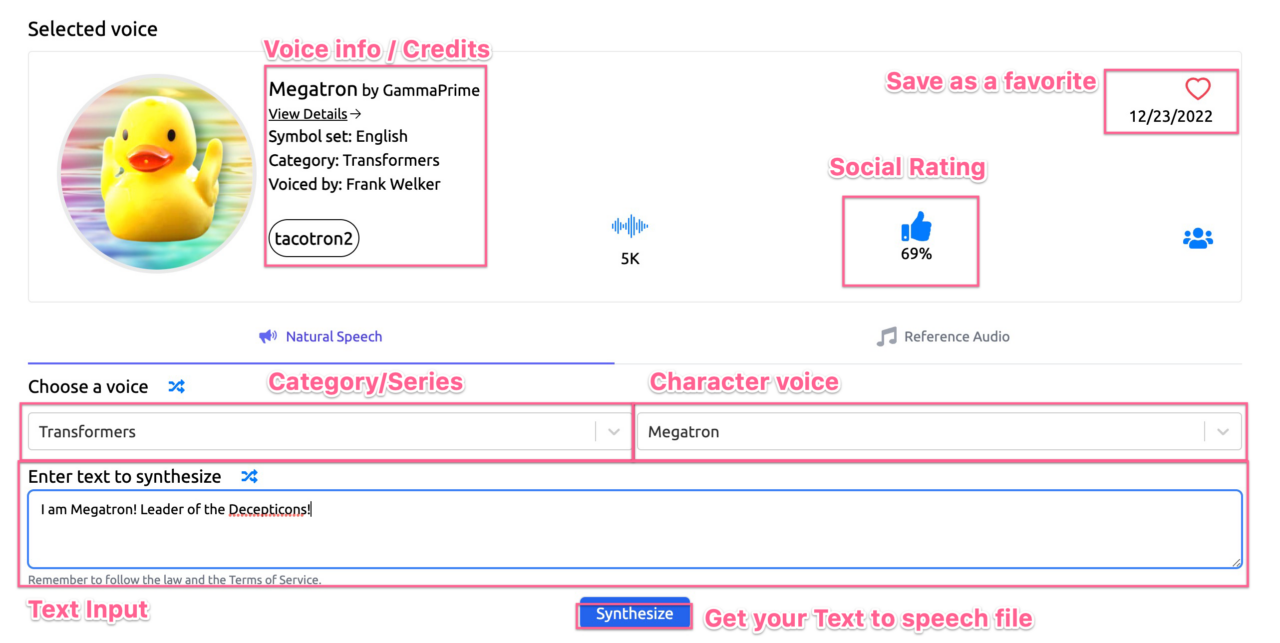

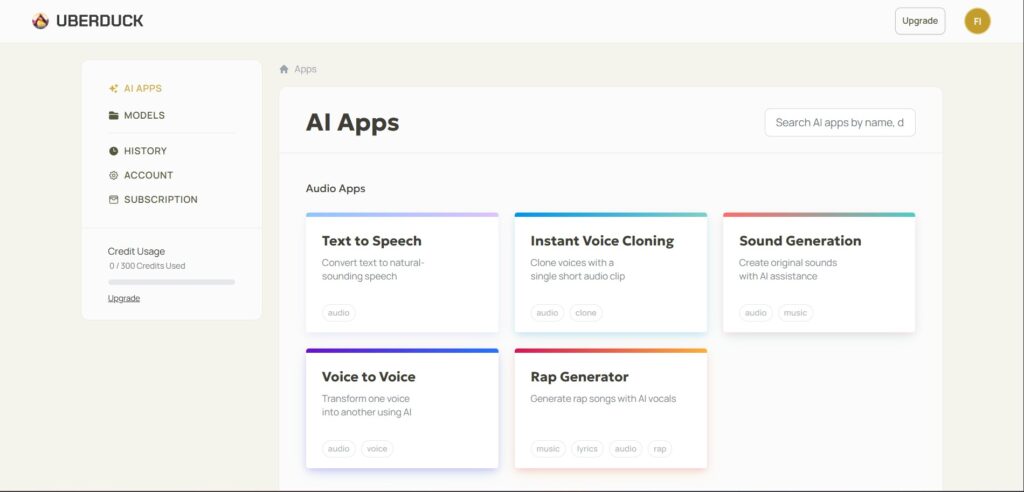
At its core, Uberduck AI is a voice synthesis platform that lets you generate spoken audio from text using artificial intelligence. That sentence alone doesn’t sound impressive—until you understand how much has changed under the hood.
Uberduck AI isn’t limited to generic “computer voices.” It focuses on expressive, character-driven, and custom voices that can be used for entertainment, marketing, development, and experimentation. Think less GPS navigation voice, more performance-ready speech.
Here’s the simplest way I explain Uberduck AI to newcomers:
It’s like having a digital voice actor that never gets tired, can switch styles on demand, and doesn’t charge by the hour.
The platform combines text-to-speech, voice cloning, and developer APIs into one ecosystem. You can type text and generate audio, clone voices (with permission), or integrate voice generation directly into applications.
What separates Uberduck AI from older text-to-speech tools is intention. It was built for creators and developers first, not accessibility add-ons or enterprise call centers. That design choice shows up in the voices, controls, and integrations.
For beginners, Uberduck AI feels playful and experimental. For advanced users, it becomes a programmable audio engine.
That range is both its biggest strength and its biggest learning curve.
How Uberduck AI Works Under the Hood (Beginner to Expert View)
On the surface, Uberduck AI looks simple: text goes in, audio comes out. But understanding the mechanics helps you get dramatically better results.
At a beginner level, Uberduck AI uses neural text-to-speech models trained on large datasets of human speech. These models learn rhythm, pronunciation, emotion, and timing—not just phonetics. That’s why modern AI voices sound less robotic and more conversational.
As you move into intermediate use, you start interacting with voice parameters. Things like pacing, emphasis, pitch stability, and pronunciation tuning matter more than people expect. Subtle changes here can mean the difference between “AI-generated” and “surprisingly natural.”
At an advanced level, Uberduck AI becomes modular. Developers can access APIs, automate voice generation, and embed speech into applications, games, or content pipelines. This is where Uberduck AI stops being a novelty and starts becoming infrastructure.
One analogy I often use:
Beginner users treat Uberduck AI like a keyboard. Experts treat it like a mixing board.
The same tool, radically different outcomes.
Understanding this progression is crucial because many people dismiss Uberduck AI after shallow experimentation. They try one voice, generate one clip, and decide it’s “not there yet.” In reality, they barely scratched the surface.
Real Benefits of Uberduck AI (And Who Actually Wins From It)
Uberduck AI isn’t for everyone—and that’s a good thing. Its real value shows up when there’s a clear mismatch between voice needs and traditional production methods.
Creators benefit because Uberduck AI removes friction. You don’t need to book talent, schedule sessions, or redo entire recordings because of one line change. If you’ve ever edited a video only to realize the script needs tweaking, you already understand the appeal.
Marketers benefit because speed matters. Audio ads, social clips, explainer videos, and product demos can be produced and iterated quickly. You can test multiple tones or scripts without multiplying costs.
Developers benefit because voice becomes programmable. Games, chatbots, virtual assistants, and interactive experiences all need dynamic speech. Uberduck AI allows voice to be treated like a function, not a fixed asset.
Educators and trainers benefit because consistency matters. Once you establish a voice style, you can reuse it across lessons without worrying about availability or variation.
Before Uberduck AI, scaling voice meant compromising quality or budget. After adopting it correctly, many teams find they can experiment more freely, ship faster, and maintain consistency across platforms.
The biggest benefit, though, is creative confidence. When voice is no longer a bottleneck, ideas move faster.
Real-World Use Cases That Actually Work (Not Hypotheticals)
I’ve seen Uberduck AI used successfully in scenarios where traditional voice workflows break down.
In short-form content, creators use UberduckAI to narrate explainer clips, commentary videos, and memes. The turnaround time is minutes instead of days, which matters when trends move fast.
In long-form content, some podcasters and educators use Uberduck AI for intros, transitions, summaries, or multilingual versions—while keeping human hosts for core segments. This hybrid approach balances authenticity and efficiency.
In gaming and interactive media, UberduckAI shines. NPC dialogue, dynamic responses, and prototyping voice interactions become feasible even for small teams.
In internal business use, Uberduck AI is used for onboarding videos, product walkthroughs, and training materials where polish matters but perfection isn’t required.
What’s important is restraint. Uberduck AI works best when used intentionally—not when it replaces every human voice indiscriminately.
A Practical Step-by-Step Guide to Using Uberduck AI Properly
The biggest mistake beginners make with UberduckAI is rushing. Good results come from process, not luck.
Start by clarifying your use case. Are you creating narration, character dialogue, marketing audio, or app-based speech? Your answer determines voice choice and settings.
Next, write for voice, not text. AI voices expose awkward phrasing more brutally than humans do. Shorter sentences, natural pauses, and conversational structure matter.
Then choose a voice that matches intent, not novelty. It’s tempting to pick the most dramatic or unusual option, but credibility often comes from subtlety.
Generate short test clips before committing. Listen critically. Adjust pacing, emphasis, and pronunciation. This step alone separates amateur results from professional ones.
Finally, integrate audio into your workflow. That might mean exporting files manually, automating via API, or layering AI voice with music and effects in post-production.
The “why” matters here: UberduckAI gives control, but control requires responsibility. Treat it like a creative tool, not a magic button.
Uberduck AI vs Other Voice AI Tools (An Honest Comparison)
UberduckAI lives in a competitive space. Tools like ElevenLabs, Play.ht, and Murf AI all offer overlapping features.
Where UberduckAI stands out is flexibility and experimentation. It leans toward creators and developers who want to push boundaries rather than businesses looking for polished corporate narration.
ElevenLabs often wins on raw realism. Murf excels in structured, business-friendly workflows. Play.ht offers accessibility and ease.
UberduckAI wins when you want character, programmability, and creative freedom.
The trade-off? UberduckAI may require more tinkering to achieve “broadcast-ready” results. For many users, that’s a feature, not a bug.
Common Mistakes With Uberduck AI (And How to Avoid Them)
The most common mistake is overusing it. Not every voice needs to be synthetic. Audiences are sensitive to authenticity, even if they can’t articulate why.
Another mistake is ignoring writing quality. AI voice amplifies bad scripts. Fix the words first.
Some users chase realism instead of clarity. Slightly less human but clearer audio often performs better.
Finally, many people ignore licensing and ethical considerations. Voice cloning, in particular, demands consent and transparency. Long-term trust matters more than short-term convenience.
Avoid these pitfalls, and UberduckAI becomes a serious asset instead of a gimmick.
The Ethical Side of Uberduck AI (What Professionals Don’t Ignore)
Any discussion of UberduckAI without ethics is incomplete. Synthetic voice technology carries real responsibility.
Using voices without permission, misleading audiences, or impersonating individuals crosses ethical and legal lines quickly. Reputable users treat UberduckAI as a tool—not a shortcut around consent.
Transparency builds trust. In many contexts, disclosing AI-generated audio is not only ethical but strategically smart.
As adoption grows, platforms and audiences alike will reward creators who use these tools responsibly.
Is Uberduck AI Worth It? A Grounded Expert Verdict
Uberduck AI is not a replacement for human creativity. It’s a multiplier.
If you need absolute realism with zero setup, you may prefer other tools. If you want creative control, scalability, and the ability to experiment without blowing budgets, UberduckAI earns its place.
The people who get the most out of UberduckAI treat it like a craft, not a hack. They listen critically, iterate patiently, and integrate thoughtfully.
Used that way, it’s one of the more interesting voice tools available right now.
Final Thoughts: How to Get the Most Out of Uberduck AI Long-Term
Uberduck AI rewards curiosity. The more you explore voices, settings, and workflows, the better your results become.
Start small. Test responsibly. Combine AI voice with good writing and sound design. Respect your audience.
Do that, and Uberduck AI stops being “AI voice software” and starts becoming part of how you create.
If you’re serious about scalable audio, it’s worth your time.
FAQs
What is Uberduck AI used for?
Uberduck AI is used for text-to-speech, voice cloning, creative audio, app development, and content production.
Is Uberduck AI free to use?
Uberduck AI offers free and paid plans, with advanced features available on paid tiers.
Can Uberduck AI clone voices legally?
Voice cloning requires proper consent and should always follow ethical and legal guidelines.
Is Uberduck AI good for YouTube videos?
Yes, especially for narration, intros, summaries, and experimental formats.
How realistic are Uberduck AI voices?
Realism varies by voice and setup. With proper tuning, results can be surprisingly natural.

Adrian Cole is a technology researcher and AI content specialist with more than seven years of experience studying automation, machine learning models, and digital innovation. He has worked with multiple tech startups as a consultant, helping them adopt smarter tools and build data-driven systems. Adrian writes simple, clear, and practical explanations of complex tech topics so readers can easily understand the future of AI.