
If you’ve ever worked with image annotation, object segmentation, or computer vision workflows, you know how quickly things can get messy. One mislabeled region, one sloppy mask, and suddenly your entire model’s performance takes a nosedive. That frustration is exactly why the sam masking technique has become such a big deal lately.
I remember the first time I had to manually create pixel-perfect masks for a dataset. It was tedious, error-prone, and honestly exhausting. When Segment Anything Model (SAM) entered the scene, it felt like someone finally handed us power tools instead of forcing us to carve stone with a chisel. But SAM alone isn’t the full story. The real magic happens when you understand and apply the sam masking technique properly.
In this guide, I’ll walk you through what the sam masking technique actually is, why it matters, and how professionals are using it in real-world projects. You’ll learn practical workflows, tool recommendations, common mistakes to avoid, and how to turn SAM from a flashy demo into a reliable production asset. Whether you’re a beginner or someone already knee-deep in computer vision, this article is designed to give you clarity, confidence, and hands-on value.
What Is the Sam Masking Technique?

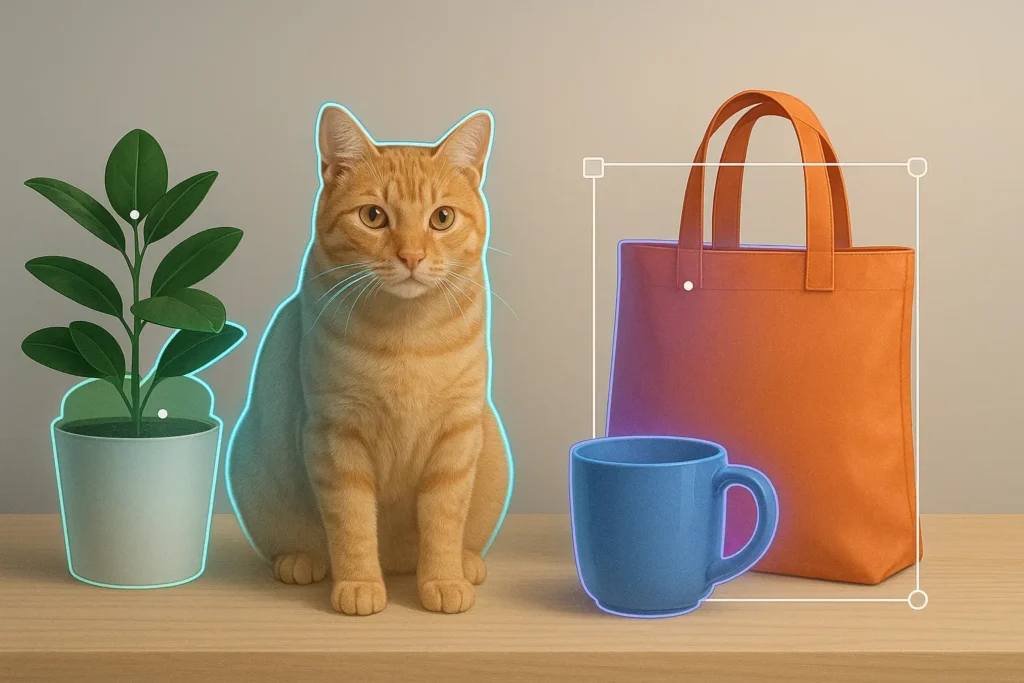
At its core, the sam masking technique refers to the practical methods used to generate, refine, and apply segmentation masks using Meta’s Segment Anything Model (SAM). Instead of manually outlining objects pixel by pixel, SAM allows you to define regions using prompts like points, boxes, or rough outlines, then automatically generates precise masks.
A helpful way to think about it is this: traditional masking is like tracing an object with a pencil, slowly and carefully. The sam masking technique is more like pointing at something and saying, “That.” The model fills in the rest with surprising accuracy.
SAM is trained on an enormous dataset of images and masks, giving it a general understanding of object boundaries across countless domains. The masking technique isn’t just about clicking once and accepting the result. It’s about guiding the model, validating outputs, and refining masks to match your specific use case.
In practice, sam masking techniques often include:
- Prompt-based masking using points or bounding boxes
- Iterative refinement by adding or removing prompts
- Combining multiple masks into structured annotations
- Exporting masks for training, labeling, or analysis
This approach bridges the gap between full automation and human control. You’re not giving up precision; you’re amplifying it.
Why the Sam Masking Technique Matters Today
The rise of the sam masking technique isn’t just hype—it’s a response to very real bottlenecks in machine learning and computer vision. High-quality labeled data is expensive, slow to produce, and difficult to maintain at scale.
Before SAM, teams often faced a brutal choice: spend weeks manually annotating images or accept lower-quality labels from automated tools. SAM changes that equation by dramatically reducing annotation time while maintaining strong accuracy.
This matters because:
- Models are only as good as their training data
- Faster annotation means faster experimentation
- Cleaner masks lead to better generalization
Beyond ML training, the sam masking technique is also influencing creative and analytical workflows. Designers use it for background removal and compositing. Researchers use it to isolate regions of interest. Product teams use it to prototype vision features without massive annotation budgets.
In short, this technique isn’t just a convenience. It’s becoming a foundational skill for anyone working with images at scale.
Benefits and Real-World Use Cases
One of the biggest strengths of the sam masking technique is its versatility. It’s not locked into a single industry or workflow. Once you understand how it works, you’ll start seeing opportunities everywhere.
For machine learning engineers, the benefit is speed. Tasks that used to take hours per image can now be done in minutes. You can annotate datasets faster, iterate on label definitions, and improve consistency across large teams.
For data scientists, it’s about precision and experimentation. You can quickly test how different segmentation strategies affect downstream performance. Instead of guessing where errors come from, you can visually inspect and adjust masks.
Creative professionals benefit too. The sam masking technique makes it easier to:
- Remove or replace backgrounds
- Isolate subjects for design work
- Generate assets for AR/VR experiences
In medical imaging and research, SAM-assisted masking can help identify regions like organs or lesions, which can then be reviewed by experts. It doesn’t replace human judgment, but it dramatically accelerates the process.
The common thread across all these use cases is control. You’re not outsourcing decisions to a black box; you’re collaborating with a model that responds to your intent.
Step-by-Step Guide to Applying the Sam Masking Technique
Let’s get practical. Here’s a structured, real-world workflow you can follow to apply the sam masking technique effectively.
Start by defining your objective. Are you creating training data, extracting objects, or analyzing regions? This clarity influences how precise your masks need to be.
Next, load your image into a SAM-compatible tool or environment. This could be a web demo, an annotation platform, or a custom Python setup.
Begin with simple prompts:
- Click a point inside the object you want to mask
- Draw a bounding box around the target region
SAM will generate an initial mask. This first result is rarely perfect, and that’s okay.
Refine iteratively:
- Add positive points where the mask should expand
- Add negative points where it should shrink
- Adjust bounding boxes if boundaries are unclear
Review the mask carefully. Zoom in on edges and complex areas. Ask yourself whether this mask would make sense to a model trained on it.
Once satisfied, export the mask in the format you need, such as PNG, COCO JSON, or NumPy arrays.
Best practices include:
- Always visually inspect masks before trusting them
- Use multiple prompts for complex objects
- Keep a consistent annotation style across datasets
This iterative, human-in-the-loop process is what truly defines the sam masking technique.
Tools, Comparisons, and Recommendations
The sam masking technique can be applied using a range of tools, from free demos to enterprise-grade platforms. Choosing the right one depends on your scale, budget, and technical comfort.
Free and open-source options are great for learning and experimentation. Meta’s official SAM demo is an excellent starting point. It lets you explore point-based and box-based masking without setup headaches.
For developers, running SAM locally via Python gives you full control. You can integrate it into custom pipelines, automate batch processing, and tweak parameters.
Paid annotation platforms often integrate SAM-like models into collaborative workflows. These tools shine when:
- Multiple annotators are involved
- Version control matters
- Quality assurance is critical
Pros of paid tools:
- Team collaboration
- Built-in QA features
- Scalable project management
Cons:
- Cost
- Less flexibility than custom code
If you’re serious about production use, my recommendation is a hybrid approach. Use open-source SAM for experimentation and prototyping, then layer it into a structured annotation platform when scaling up.
Common Mistakes and How to Fix Them
Even with a powerful model, the sam masking technique isn’t foolproof. I’ve seen the same mistakes repeated across teams, usually because people expect magic instead of collaboration.
One common error is overtrusting the first mask. SAM is strong, but it’s not psychic. Always refine and review.
Another mistake is inconsistent prompting. If different annotators use wildly different strategies, your dataset will reflect that inconsistency.
Fix this by:
- Defining clear annotation guidelines
- Training annotators on prompt usage
- Reviewing samples regularly
People also forget context. SAM may segment an object perfectly, but not the object you intended. Clear prompts and human oversight prevent this.
Finally, some teams ignore edge cases. Complex boundaries, overlapping objects, and unusual lighting need extra attention. Don’t rush these; they’re often the most important samples.
Conclusion
The sam masking technique isn’t just another buzzword in computer vision. It’s a practical, powerful way to rethink how we interact with images and data. By combining SAM’s general intelligence with human intent, you get the best of both worlds: speed and precision.
If you take one thing away from this guide, let it be this: treat SAM as a collaborator, not a replacement. Guide it, challenge it, and refine its outputs. When you do, you’ll unlock workflows that are faster, cleaner, and far more scalable than traditional methods.
If you’re experimenting with the sam masking technique right now, I’d encourage you to start small, iterate often, and document what works. And if you have questions or insights from your own projects, share them—this space is evolving quickly, and we all learn faster together.
FAQs
What is the sam masking technique used for?
The sam masking technique is used to generate and refine image segmentation masks using the Segment Anything Model, commonly for annotation, analysis, and visual editing.
Is the sam masking technique fully automated?
No. While SAM generates masks automatically, effective use requires human prompts, review, and refinement.
Do I need coding skills to use SAM masking?
Not necessarily. Many tools offer no-code interfaces, though coding helps for customization and scaling.
How accurate are SAM-generated masks?
They are generally very accurate, but quality depends on prompts and human validation.
Can the sam masking technique be used for medical images?
Yes, but results should always be reviewed by qualified professionals

Adrian Cole is a technology researcher and AI content specialist with more than seven years of experience studying automation, machine learning models, and digital innovation. He has worked with multiple tech startups as a consultant, helping them adopt smarter tools and build data-driven systems. Adrian writes simple, clear, and practical explanations of complex tech topics so readers can easily understand the future of AI.